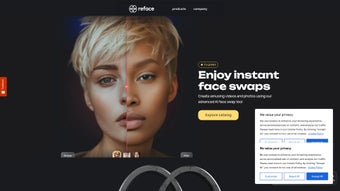

Download Reface – AI Face‑Swap App, Free, Secure, Fast
Overview
Reface is an AI‑powered face‑swap app that transforms ordinary photos, GIFs, memes and short videos into personalized, hyper‑realistic creations. By leveraging cutting‑edge facial‑recognition and deep‑learning models, Reface can map your facial features onto a wide range of media with astonishing precision, making the result look as if you were truly part of the original content. The app goes beyond static image swaps; it can animate still photos, make characters sing, and even generate short video clips where your face performs the original action.
While the consumer‑focused version is free to download and use, Reface also offers B2B solutions for brands and developers who want to embed face‑swap technology into their own products. The developers follow the European Union’s AI labeling guidelines, ensuring transparency and ethical use of the technology. Whether you’re looking to create viral social‑media content, add a playful twist to presentations, or explore AI‑driven marketing tools, Reface provides a secure, regularly updated platform that works on multiple devices.
Its intuitive UI, rapid rendering speed, and strong privacy stance make it a standout choice in the crowded market of visual‑effect apps. The app also supports offline mode for basic swaps, giving users flexibility when traveling or working with limited bandwidth. Overall, Reface blends entertainment with professional‑grade AI, delivering a tool that feels both fun and reliable for creators of all skill levels.
Key Features of Reface
Reface packs a powerful suite of capabilities that cater to casual users, influencers, and enterprise clients alike. Each feature has been engineered to run efficiently on mobile hardware while still delivering studio‑grade quality. Below you’ll find a detailed rundown of what the app can do, followed by a concise feature list for quick reference.
- Real‑time face swapping – Instant mapping of your face onto videos, GIFs and images with studio‑grade realism.
- AI‑driven animation – Turn static portraits into moving, singing, or talking avatars in seconds.
- Extensive media library – Thousands of trending clips, memes, and celebrity videos are available for immediate swapping.
- One‑tap sharing – Export your creations directly to Instagram, TikTok, WhatsApp, Snapchat, or save them to your device.
- Secure cloud processing – All facial data is processed on encrypted servers; no personal images are stored long‑term.
- Regular AI updates – Monthly model improvements keep the swaps more natural and the app faster.
- B2B API & SDK – Brands can integrate Reface technology into marketing campaigns, apps, or websites.
- EU AI labeling compliance – Transparent disclosure of AI usage, meeting GDPR and upcoming AI‑act requirements.
- Cross‑platform support – Available on Android, iOS, Windows (via Microsoft Store) and macOS (via Catalyst).
- Offline mode – Perform basic swaps without an internet connection after the initial model download.
- Custom watermark removal – Premium users can disable the Reface watermark for a cleaner final product.
These features work together to create a seamless workflow: you select a source image, choose a target clip, let the AI do the heavy lifting, and then share or export the result in just a few taps. The combination of speed, quality, and privacy makes Reface a compelling option for anyone looking to add a professional touch to their visual content without investing in expensive software.
Installation & Usage Guide
Step‑by‑step download
1. Open the App Store on iOS devices, Google Play Store on Android, or the Microsoft Store for Windows 10/11.
2.
Search for “Reface – AI Face Swap”.
3. Tap “Get” or “Install”.
The download size is roughly 150 MB, and the installer verifies the app’s digital signature to guarantee a secure installation.
4. Once installed, launch the app and grant camera, photo‑library, and microphone permissions – these are essential for face detection and video export.
5. After the first launch, the app will download the latest AI model package (approximately 200 MB) over a secure HTTPS connection. This step ensures you have the most up‑to‑date facial‑mapping algorithms.
Creating your first face swap
After the initial launch, you’ll be greeted by a short tutorial that explains the main interface. The main screen shows a carousel of popular clips and a “Camera” button. To start:
- Tap the “Camera” icon or choose a photo from your gallery that contains a clear, front‑facing portrait.
- Align your face within the on‑screen guide; the AI automatically detects facial landmarks (eyes, nose, mouth).
- Select a target media – a meme, a movie scene, or a GIF – from the built‑in library or import your own short video.
- Press “Swap”. Within seconds, Reface renders a preview where your face replaces the original actor’s.
- Use the editing tools to adjust lighting, add stickers, or trim the clip. When satisfied, tap “Export”. You can save locally (HD up to 1080p) or share directly to social platforms.
- If you prefer a higher resolution, upgrade to the premium plan and choose the 4K export option for crystal‑clear detail.
The app also offers a “Batch Swap” feature for power users, allowing you to apply the same face to multiple clips in one operation. This is especially handy for creating themed content series or marketing assets where consistency is key.
Tips for best results
- Use a well‑lit, neutral‑background selfie for optimal facial landmark detection.
- Keep your head relatively still; extreme angles may reduce swap accuracy.
- Choose media with similar face orientation – front‑facing clips work best.
- Explore the “Animated Portrait” feature to turn old photos into moving avatars.
- When exporting, select the appropriate aspect ratio (1:1 for Instagram, 9:16 for TikTok) to avoid black bars.
By following these guidelines, you’ll maximize the realism of each swap and reduce the need for post‑processing. Reface’s AI continually learns from each swap, so the more you use it, the more refined the results become.
Compatibility, Pros & Cons
Reface runs on iOS 12 or later, Android 8.0 and up, Windows 10 (through the Microsoft Store) and macOS 11 or newer (via Catalyst). The app is optimized for both smartphones and tablets; on desktop, it offers a lightweight Electron‑based client that mirrors the mobile experience. All versions receive synchronized updates, ensuring feature parity across platforms. System requirements include at least 2 GB of RAM and a GPU that supports OpenGL ES 3.0 for smooth rendering. Battery consumption is moderate on newer devices, but older hardware may experience a slight dip during intensive swaps.
Pros
- Ultra‑realistic swaps thanks to proprietary deep‑learning models.
- Fast processing – most swaps render in under 5 seconds.
- Free core features with optional premium subscription for ad‑free experience and higher‑resolution exports.
- Strong privacy stance: no permanent storage of user photos on the cloud.
- Regular content updates keep the media library fresh and relevant.
- Cross‑platform support ensures a consistent experience on mobile and desktop.
- Offline mode enables basic swaps without an internet connection after initial model download.
Cons
- Free version includes watermark on exported videos.
- Heavy CPU/GPU usage may cause battery drain on older smartphones.
- Premium subscription required for 4K export and unlimited swaps.
- Some copyrighted clips are restricted in certain regions due to licensing.
- Initial model download can be sizable for users with limited data plans.
FAQ & Final Thoughts
Is Reface safe for my personal photos?
Yes. All facial processing occurs on encrypted servers and images are deleted within 24 hours. The app never sells your data, and you can opt‑out of cloud processing by using the offline mode (available on desktop).
Do I need an internet connection to create swaps?
A connection is required for the AI inference engine because the heavy model runs in the cloud. However, low‑resolution previews can be generated offline after the initial download of the model package.
Can I use Reface for commercial projects?
Absolutely. Reface offers a B2B API and licensing options that let brands embed face‑swap features into ads, apps, or websites. Contact the sales team directly through the app’s “Business” tab.
What are the subscription costs?
The premium plan is $4.99 / month or $49.99 / year. It removes watermarks, unlocks 4K export, provides unlimited swaps, and grants early access to new AI models.
Will Reface work on older devices?
The minimum OS requirements (iOS 12, Android 8) cover most devices released after 2017. Performance may be slower on low‑end hardware, but the app will still function.
How does Reface handle user privacy and data retention?
All uploaded media is encrypted in transit and at rest. After processing, the files are automatically purged from the servers within 24 hours. Users can also manually delete their processing history from the settings menu.
Can I customize the watermark or branding on exported videos?
The free version includes a small Reface watermark. Premium subscribers can disable the watermark entirely or replace it with a custom logo through the “Branding” option in the export settings.
Conclusion – Should You Download Reface?
In a market flooded with novelty filters, Reface stands out for its blend of high‑quality AI, user‑friendly workflow, and a clear commitment to privacy. The free tier lets you experiment without spending a dime, while the reasonably priced premium upgrade unlocks professional‑grade features that are perfect for content creators, marketers, and anyone who wants to add a personal touch to viral media. If you’re looking for a secure, regularly updated face‑swap tool that works across iOS, Android, Windows, and macOS, Reface is a solid download. Its fast rendering, extensive media library, and cross‑platform consistency make it a valuable addition to any creator’s toolkit. Click the button below to install the app and start swapping today!
Download Reface Now


.png)



